


We now support custom leave policies for your EOR
If your employees have unused annual leave at year-end, you've been working with a fixed rule: those credits expire on 31 January. Use it or lose it - no flexibility, no extension, and no way to align the deadline with how your team actually works.
That's a problem when you're managing people across markets with different peak seasons and different statutory requirements. A team in the Philippines running flat out through December shouldn't lose their carry-over to a January deadline. An employee on maternity or sick leave during the year shouldn't forfeit credits they genuinely couldn't use.
You can now change this. HR admins can set any company-wide expiry date - 30 June, 31 March, or any date that suits your business cycle - across all six Outstaffer EOR markets: Philippines, Vietnam, Malaysia, Thailand, Australia, and Singapore. Your employees' earned leave can carry over into the next year instead of expiring, and employees on statutory leave are protected throughout.
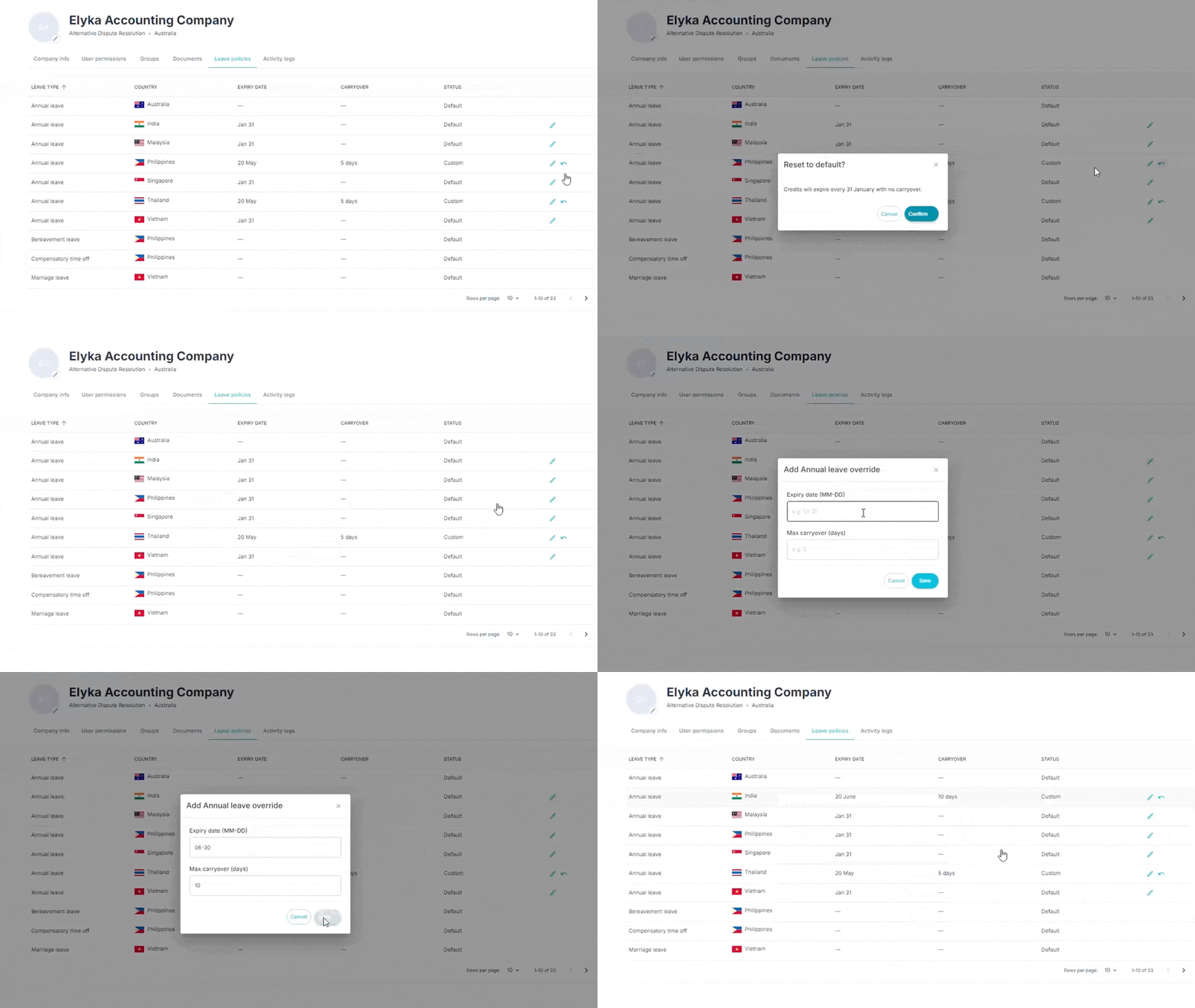
Extend leave credit expiry to a custom date
Platform HR and Company HR can now override the default 31 January expiry for carryover leave credits and set a custom company-wide date. Leave taken during the extension window is deducted from carryover credits first, and newly accrued credits aren't affected.
If your team in the Philippines runs flat out through Q4, they've likely hit the 1 February deadline with unused carry-over and lost it. Set your company expiry date to 30 June and those credits roll over - your employees keep what they've earned and actually have time to use it.
HR can manage leave types via a dedicated module
A new Leave Types module lets Platform HR define and manage categories of leave at the company level - annual, sick, maternity, and others. Configured types flow through to leave requests and entitlement calculations automatically.
Leave entitlements auto-credited on employee start date
When a new employee is activated, their leave entitlements are automatically credited based on the applicable company leave policy. No manual setup required.
Company leave policies fully configurable by HR admins
HR admins can now create and manage leave policies at the company level, setting entitlement rules without relying on platform defaults.
Also new this month
Subscriptions auto-created on offer acceptance
Once a candidate accepts their offer, a subscription is automatically created. Every new employee is on the correct plan from day one - no manual billing setup.
Admin activates employees from onboarding table or profile
Admins can now activate employees via the ellipsis menu on the Onboarding table or from a banner on the employee's profile page. Both flows confirm via a modal and immediately update the employee to Active.
What got faster or cleaner
Leave policy changes captured in activity logs
Any changes to a company's leave policy are now recorded in Activity Logs - useful for audit trails.
Contract status updates now open as a modal
The Update contract status action now opens as a modal overlay instead of routing to a separate page. No context switch when working through multiple employees.
Cost of employment aligned with invoice rates
The live exchange rate toggle has been removed from the Cost of Employment page. Figures on screen now match what appears on invoices.
Export timesheets in Sprout Payroll format
Admins can export timesheets in Sprout's HRIS Biologs format, ready for direct upload. Times auto-convert to PH time.
What got fixed
Candidate resumes open reliably in the in-platform viewer
A bug causing candidate resumes to fail intermittently in the platform's built-in document viewer has been resolved.
Check out the full release notes →
More from
EOR
category





%201.svg)
